Query example
Let's say we have a task to make an audit on which devices in our network we have 100G MDAs installed and what slots they occupy.
In the XML format this part of configuration looks like that:
<configure xmlns="urn:nokia.com:sros:ns:yang:sr:conf">
    <card>
        <slot-number>1</slot-number>
        <mda>
            <mda-slot>1</mda-slot>
            <mda-type>m6-10g-sfp++1-100g-qsfp28</mda-type>
        </mda>
        <mda>
            <mda-slot>2</mda-slot>
            <mda-type>m6-10g-sfp++1-100g-qsfp28</mda-type>
        </mda>
        <mda>
            <mda-slot>3</mda-slot>
            <mda-type>m10-10g-sfp+</mda-type>
        </mda>
        <mda>
            <mda-slot>4</mda-slot>
            <mda-type>m10-10g-sfp+</mda-type>
        </mda>
    </card>
</configure>
Construct XPath
In case we need to collect the information about the card slot and MDA slot along with the type of MDA, we're gonna need to build the following XPath in the constructor:
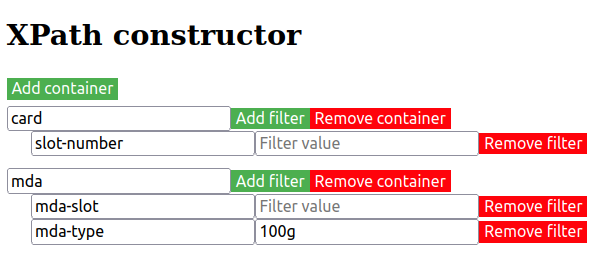
From the <card> container we move down through the hierarchy and add container <mda> as well, while selecting LeafNodes <slot-number>, <mda-slot> and <mda-type> for the resulting output.
Please note that empty "Filter value" means that "match all" regexp (.*) will be applied.
Generally, one can use either Model Navigator or to build XPath by navigating the XML-configuration.
Select devices
Select routers 2 and 3 for the audit in the "Device selection" area.
Results
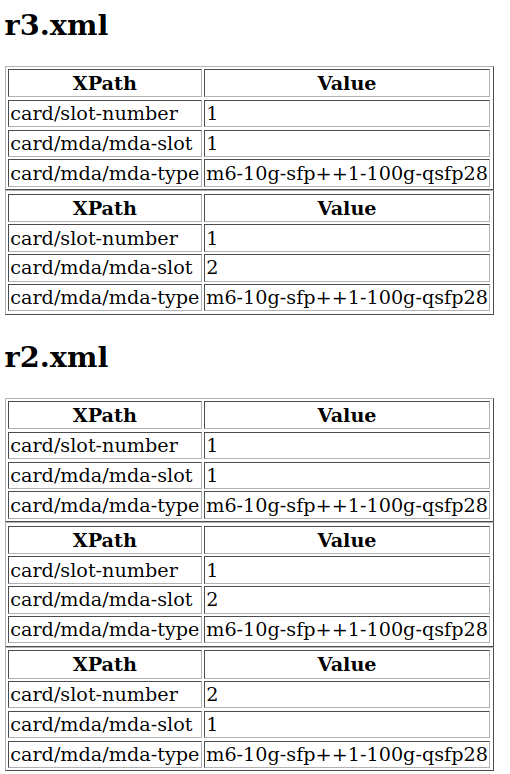
On the result page we see that both routers have cards with 100G MDAs installed.