Guidelines
Overview
To run the XPath query over device configurations represented as XML, two things has to be made:
Devices have to be selected
XPath has to be constructed
There are three main modules on the page: Device selection, XPath constructor, YANG model navigator.
Device selection
This part is self-explanatory just select the click-box across devices which configuration you need to audit.
You may also filter the device by hostname or select all of them. And in case you need to check the configuration — click on the device itself.
XPath constructor
Here you have to create the XPath, represented as a hierarchical structure of containers and filters.
As containers, you may use YANG data structures ContainerNode or ListNode. And as filters — LeafNode, LeafListNode and ChoiceNode. There is a very well written RFC 6020 on YANG Data Modelling.
To have an output from the XPath query, you need to specify at least one filter in the hierarchy. For example, "description" Leaf under the "port" Container.
"Filter value" field is for specifying a match criteria for a Node value. It has to be specified in a Python RegEx syntax. For each filter there is a default value ".*", i.e. "match all".
YANG model navigator
This module can help you to navigate through the YANG model. For example, you may check what can be configured for BGP under EPIPE service context:
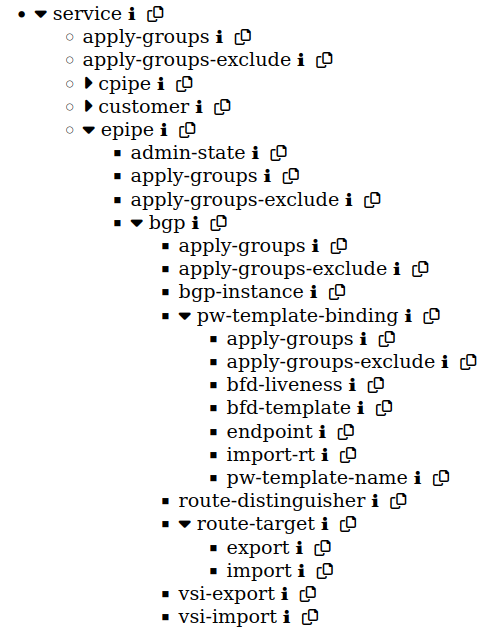
It's also possible to check the description (by hovering to ℹ symbol) and copy the name of the node with 📋 button.
Submit request
After selecting devices for parsing and constructing XPath, you may run this request by clicking "Submit request"
New Tab will be opened with the result.